08/12/2026 - August Blueprint Software Updates
We’re pleased to share that the Blueprint enhancements listed below will be deployed over the weekend of August 14. These updates are designed to improve functionality, streamline workflows, and enhance your overall experience.
BLUEPRINT ENHANCEMENTS
Loan Status Snapshot
-
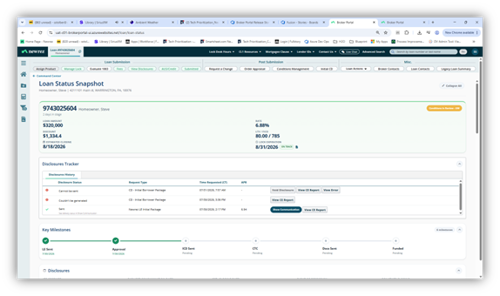
Loan Status Snapshot provides a clear, easy-to-read summary of key loan details.
-
Users can access this view by selecting the Loan Status Snapshot tile from the Command Center.
Data Validation (DV)
When a user resolves a DV, they will now return to the original screen where the DV was launched. This update provides a smoother and more intuitive navigation experience.

Notification Messages
-
Red notification messages in the upper-right corner of the screen will now include more specific error details, making it easier for users to identify and resolve issues.
-
The current message, “Something went wrong. Please try again,” will be replaced with information that explains what is causing the error.
New Loan Advisor Tiles for Locked First and Second Mortgages
New Loan Advisor tiles have been added to provide users with direct access to key Loan Advisor screens.
First Mortgages:
-
A new Loan Compare / Loan Advisor tile has been added. This tile takes users directly to the Loan Product Search screen in Loan Advisor.
Second Mortgages:
-
The Loan Compare / Loan Advisor tile is now also available for second mortgage loans. This tile provides direct access to the Loan Product Search screen in Loan Advisor.
-
A new Manage Lock tile has also been added to the second mortgage workflow. Selecting this tile takes users directly to the Manage Lock screen in Loan Advisor, matching the existing functionality for first mortgage loans.
Demographic Information
-
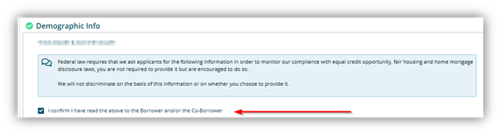
The checkbox and statement, “I confirm I have read the above to the Borrower and/or the Co-Borrower,” have been removed from the Demographic Information section of the 1003 screen.
-
This update streamlines the screen by removing the acknowledgment requirement from this section.
Global Login Access Changes
-
Users who are associated with multiple companies under the same client can now switch between companies without logging out and back in. To switch companies, select the Switch Business Partner button in the top navigation banner.
-
When creating a new loan, users associated with multiple companies under the same client will see a drop-down menu to select the company for the loan. This enhancement provides greater flexibility and makes the loan creation process easier and more efficient.
Ordering an Appraisal
UAD 3.6 appraisal options are now available within the appraisal ordering screen.
-
The updated options are available in the Select the type of appraisal you need to order drop-down menu, as shown in the screenshot below.
-
When a user selects Appraisal URAR, a new field called Property Valuation Method will appear. Users can use this drop-down menu to select the appropriate valuation method for the appraisal request. The second screenshot below shows the available options.